GitHub Release Process
OIBus releases are automated end-to-end by GitHub Actions: contributors only land Conventional-Commits
PRs, and the rest — version bumping, changelog, multi-platform binaries, Docker images, documentation
deployment — runs from a single push to the stable branch.
This page explains the moving parts so you can either trace a release that's in flight, prepare a pre-release for testing, or update the pipeline itself.
Official releases of OIBus — both stable and pre-release — are cut only by the Optimistik team, on
the OptimistikSAS/OIBus repository. The team owns the release schedule, the signing keys, and the
publishing channels (GitHub Releases, ghcr.io, the documentation site). External contributors
don't trigger releases directly: your change ships when the maintainers next promote main to
stable. This page is reference material — for understanding what happens after your PR lands, or for
maintainers operating the pipeline.
Branching model
| Branch | Purpose |
|---|---|
main | Day-to-day work — every PR squash-merges here. Always green; never released directly. |
stable | Release branch — receives main periodically, triggers the release workflow on push. |
A release is initiated by fast-forwarding stable to main (typically via a PR from main). No
other manual step is required — the rest happens via Actions.
The pipeline at a glance
  ◇ PR squash-merged to main      ← daily contributions (Conventional Commits)
            │
  ◇ main fast-forwarded to stable ← release trigger (manual)
            │
            ▼
  .github/workflows/new_release.yml         (on: push → stable)
    └── googleapis/release-please-action
          ├─ Opens a "release PR" against stable
          │  (bumps every package.json + lockfile + openapi.json + Dockerfile
          │   + docker.mdx, regenerates the CHANGELOG)
          └─ When that PR is merged → tags + publishes a GitHub Release
            │
            ▼
  .github/workflows/build.yml   (on: release published — or manual workflow_dispatch)
    ├── prepare              → resolve release info + generate the SBOM (once)
    ├── build (5-platform matrix) → build · sign (Windows) · package · upload to the release
    ├── snyk                 → monitor the SBOM                         (stable only)
    ├── docker               → build & push the multi-arch image to ghcr.io
    ├── deploy-documentation → build & publish the documentation site   (stable only)
    └── slack                → notification → #oibus-ci
All files referenced live under .github/:
workflows/new_release.yml— runs release-please on every push tostableworkflows/build.yml— everything that runs once a Release is published (binaries, Docker, docs)release-please-config.jsonrelease-please-manifest.json
📦 release-please
release-please is the only thing that ever changes the version number. It reads commits since the last tag, decides the bump, and writes the changes into a PR for the maintainers to review.
Version-bump rules
Driven entirely by commit type — same as Conventional Commits:
| Commit type | Version bump | Example |
|---|---|---|
fix: | Patch — 0.0.x | fix(cache): correct chunk write |
feat: | Minor — 0.x.0 | feat(north): add SFTP retry |
feat!: or footer BREAKING CHANGE: | Major — x.0.0 | feat(north)!: replace handleValues |
Other types (docs, chore, refactor, perf, test, style, build, ci) do not bump the
version — they're recorded in the changelog under the relevant section without causing a release.
What release-please rewrites
When a release PR lands, release-please updates the version field in:
| File | Field / how |
|---|---|
backend/package.json | version |
backend/package-lock.json | version + packages[""].version |
frontend/package.json | version |
frontend/package-lock.json | version + packages[""].version |
launcher/package.json | version |
launcher/package-lock.json | version + packages[""].version |
documentation/package.json | version |
documentation/package-lock.json | version + packages[""].version |
documentation/docs/api/openapi.json | $.info.version |
build/docker/Dockerfile | version string (generic replacer) |
documentation/docs/developer/docker.mdx | version string (generic replacer) |
CHANGELOG.md | new entry prepended |
The JSON files are updated by jsonpath; the Dockerfile and docker.mdx use release-please's
generic replacer (it rewrites the version on lines annotated with an x-release-please-version
marker). The exact rules are in
release-please-config.json
under extra-files — if you add a new package or another file that should track the release version,
extend that list.
🛠 What the release workflow actually produces
build.yml runs on release: types: [published] — i.e. only after release-please's release PR has
been merged and the GitHub Release object is created. (It can also be triggered manually via
workflow_dispatch, optionally with a tag input, to rebuild a specific release.) It is a single
workflow of cooperating jobs:
prepare
Runs once. Resolves the release info (tag_name, release_name, whether it's a prerelease) and
generates the SBOM once (cdxgen → oibus-sbom.json), uploading it as a workflow artifact and —
for non-prereleases only — attaching it to the GitHub Release. The matrix builds download this single
artifact rather than each regenerating it.
build (5-platform matrix, needs: prepare)
| Friendly name | OS runner | Platform target |
|---|---|---|
| macOS arm64 | macos-15 | macos-arm64 |
| macOS x64 | macos-15-intel | macos-x64 |
| Windows x64 | windows-2025 | win-x64 |
| Linux x64 | ubuntu-24.04 | linux-x64 |
| Linux arm64 | ubuntu-24.04-arm | linux-arm64 |
Each matrix row (fail-fast: false, so one platform failing doesn't cancel the others):
- Builds the frontend, the launcher, and the backend for its platform.
- Signs the Windows binaries (
oibus.exe,oibus-launcher.exe) via Google Cloud KMS + Sectigo timestamping (runs only on the Windows row). - Sanity-checks the runtime by invoking
oibus-launcher --version true. - Bundles the SBOM from
prepareinto the package, then packages a zip (oibus-<platform>-<tag>.zip) and uploads it to the GitHub Release. - Windows only: builds the Inno Setup installer (
oibus-win_x64-setup-<tag>.exe) and uploads it.
snyk, docker, deploy-documentation, slack (needs: build)
| Job | Runs when | What it does |
|---|---|---|
snyk | stable only | Monitors the SBOM with Snyk (snyk monitor, target reference OIBus-<tag>). |
docker | always | Builds & pushes the multi-arch image (linux/amd64,linux/arm64) to ghcr.io/optimistiksas/oibus. |
deploy-documentation | stable only | Builds the Docusaurus site and publishes it to GitHub Pages (needs: [build, docker]). |
slack | always (always()) | Notifies #oibus-ci with the docker job result (needs: [snyk, docker, deploy-documentation]). |
The Docker image tags depend on the release kind:
- Stable releases get the
latesttag and the version tag. - Pre-releases get the
betatag and the version tag.
🆕 Creating a pre-release
Pre-releases are useful when you need to publish artefacts for testing before cutting a stable
release — typically reserved for the maintainers (operators of OptimistikSAS/OIBus).
A pre-release runs the same build.yml matrix but skips the Snyk monitoring, the SBOM
release-asset upload and the documentation deployment, and the Docker image gets the beta tag
instead of latest. (The SBOM is still generated in prepare and bundled inside each zip — only the
separate release-asset upload is skipped.)
Steps
-
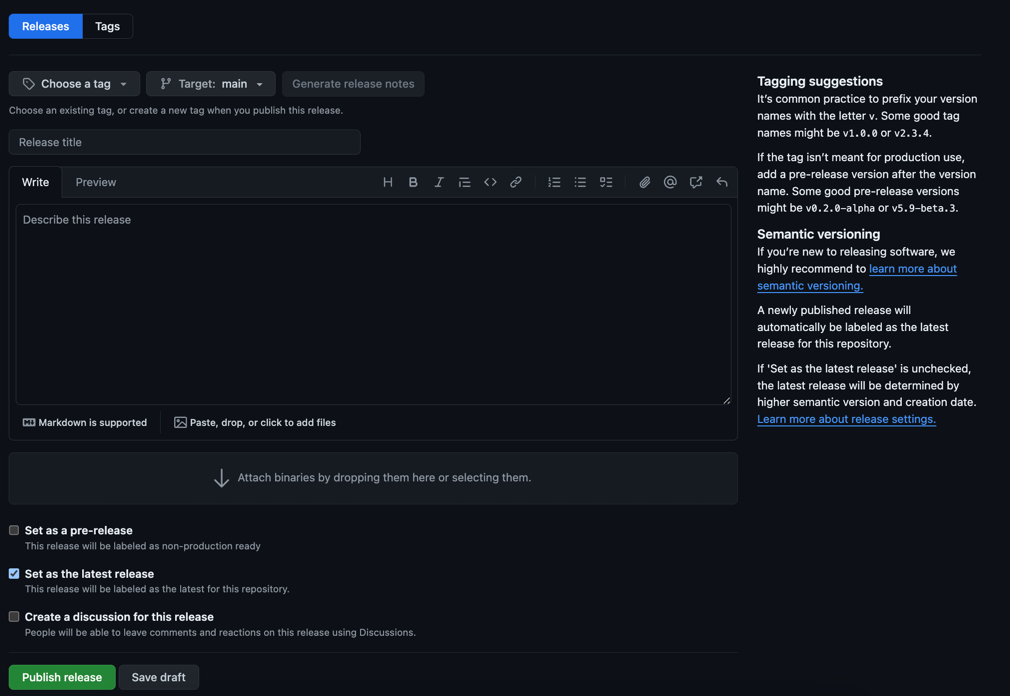
On GitHub → Releases, click Draft a new release.
-
Fill in the form:
- Tag:
vX.Y.Z-<suffix>.N(semver pre-release suffix —alpha.1,beta.1,rc.1). - Target: the branch or commit you want to build from (usually
main). - Title:
vX.Y.Z-<suffix>.N (Pre-release). - Description: what changed since the last (pre-)release, known issues, and testing instructions for the people who will pick it up.
- Set as a pre-release: ✅ check it.
- Set as the latest release: ❌ leave it unchecked — pre-releases must not become the default download.
- Tag:
-
Click Publish release. The publish event fires
build.yml; binaries and thebeta-tagged Docker image will be available a few minutes later, alongside a Slack notification.
Stick to the standard semver suffixes (-alpha, -beta, -rc) and a numeric counter. They sort
correctly against future stable releases (v3.8.0-rc.1 < v3.8.0) and the Docker beta tag picks them
up automatically.
Troubleshooting
| Symptom | What to check |
|---|---|
No release PR appears after pushing to stable | release-please only opens a PR when there are bumping commits since the last tag. chore: / docs: alone don't bump. |
| Release PR opened but with the wrong version | Inspect the commit subjects — a feat!: anywhere drives a major bump. Edit release-please-manifest.json if you need to correct the next version manually. |
build.yml doesn't fire | Confirm a GitHub Release object was actually created (not just a tag). build.yml listens on release: types: [published] (or run it manually via workflow_dispatch). |
| Windows binaries unsigned | The KMS auth step needs the GCP_SERVICE_ACCOUNT_JSON and CERT secrets configured for the running repository / fork — these aren't available on contributor forks. |
Docker image not tagged latest | The release was marked as pre-release. Stable releases get latest; pre-releases get beta. See the docker job in build.yml. |
| Documentation site didn't update | The deploy-documentation job (in build.yml) runs only for non-prereleases and needs: [build, docker] — confirm the release wasn't a pre-release and that the build + docker jobs succeeded. |
| A single platform failed but others shipped | Expected — the build matrix is fail-fast: false. Re-run just the failed job, or re-run build.yml for the tag via workflow_dispatch. |
The release workflow needs REPO_ACCESS_TOKEN, GCP_SERVICE_ACCOUNT_JSON, CERT, SNYK_TOKEN, and
SLACK_BOT_TOKEN secrets. Forks won't have those by default; the workflow will skip the parts it can't
authenticate, but you'll get an incomplete artefact set. The pipeline is designed to be run from
OptimistikSAS/OIBus itself.